

 5 MYSTERY GIFTS


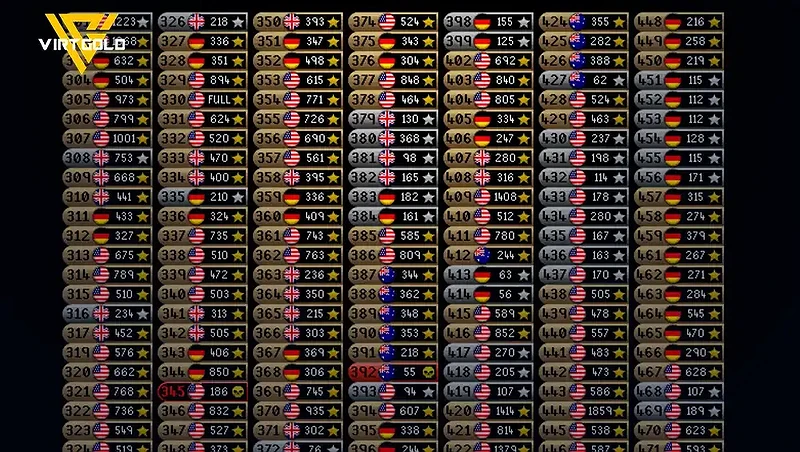
If you play OSRS, you already know that hopping between worlds is quick and easy. The problem is that the World Selector can get messy fast, with worlds you never use, PvP servers, minigame worlds, and regions that may give you terrible ping. If you've ever wondered whether there's a way to clean up and organize that list, the answer is yes.
The OSRS World Selector gives you several ways to sort worlds by number, region, activity, and name, along with filters that let you hide entire categories of worlds you don't need.
In this guide, we'll break down all the useful World Selector options, explain what each sorting arrow does, go over the filters you can use, and show you how to quickly find specific worlds for the activities you're interested in.
You may be interested our Guide:
- How to Buy OSRS Gold Safely Without Getting Banned
- OSRS - Bond Guide 2025
- RuneLite Desktop Will Stop Working in 2026
- Training Sailing 30 to 55 FAST!
- New Leechfin Fishing Method in OSRS (2026)

Why Should You Organize Your OSRS Worlds?
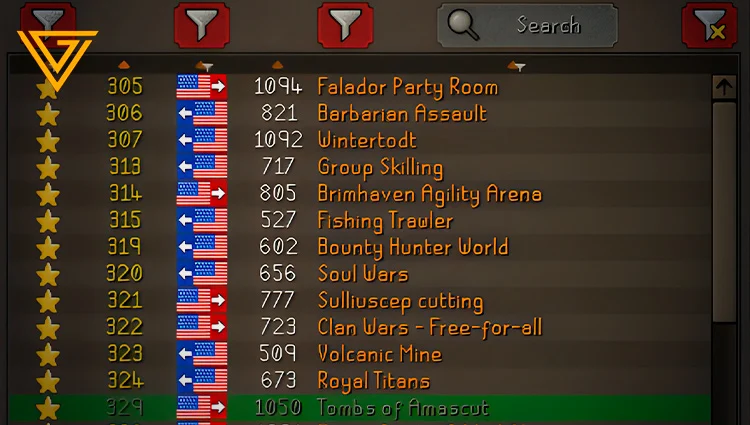
The OSRS World Selector can get messy fast.
By default, you're dealing with a mix of Free-to-Play, Members, PvP, Deadman, Speedrunning, PvP Arena, event, beta, and region-specific worlds. If you mainly play standard Members content like PvM, skilling, quests, or bosses, having all of these worlds visible can make finding the right server more tedious than it needs to be.
World Type Examples
- Free-to-Play worlds
- Members worlds
- PvP Worlds
- Deadman worlds
- Speedrunning worlds
- PvP Arena worlds
- Event worlds
- Beta worlds
- Different regional servers
Your world region can also have a direct impact on your connection.
If you're playing from the other side of the world, an Australian server, for example, can give you significantly higher latency. That extra delay can affect how responsive the game feels, especially during activities where timing and quick reactions matter. A server located closer to you will generally provide a more comfortable connection.
That's why properly configuring your OSRS World Selector is a simple quality-of-life upgrade. By hiding worlds you don't use and prioritizing regions with better latency, you can spend less time scrolling through the list every time you need to hop and get back to playing faster.
How to Configure the OSRS World Selector
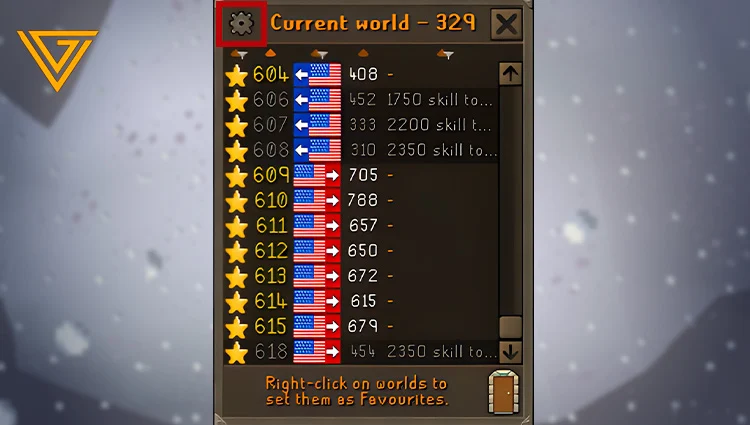
While switching worlds through RuneLite is already pretty convenient, the real difference comes from the Settings tab. This is where you can control exactly which types of worlds appear in your World Selector.
If you're trying to keep your world list clean and make world hopping faster, these filters are the first things you should configure.
Filter 1: Hide F2P or Members Worlds
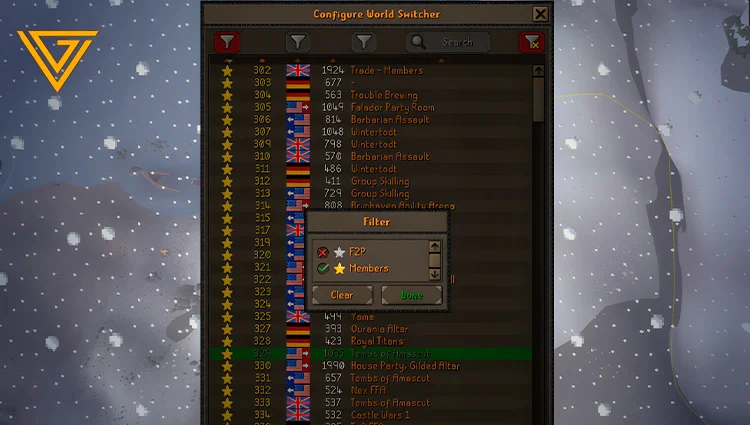
The first filter lets you control whether Free-to-Play worlds appear in your world list.
If you're a Members player and never use F2P servers, you can simply disable them.
Once they're hidden, they disappear from the selector, leaving you with the worlds you actually care about. This cuts down on visual clutter and makes it easier to find the right server when you're hopping.
Recommended Setup
If you're playing Members-only content:
- Free-to-Play worlds
- Members worlds
This is a simple change, but it can make the world list noticeably easier to navigate.
Want to gear up to face the new Maggot King boss easily and safely? Check out our CATALOG.
Filter 2: Choose Which Regions Appear
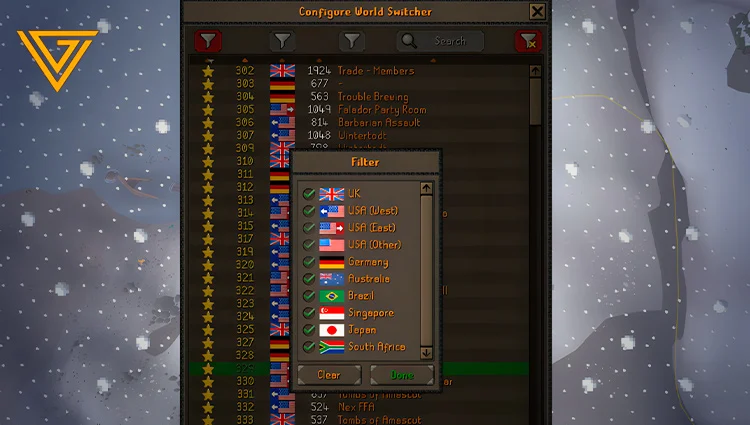
The second filter controls server locations.
You can choose which regions you want to keep visible and remove locations where you consistently get poor latency.
Depending on the available worlds, you may see regions such as:
- 🇺🇸 United States
- 🇬🇧 United Kingdom
- 🇩🇪 Germany
- 🇦🇺 Australia
- 🇧🇷 Brazil
- 🇯🇵 Japan
- 🇿🇦 South Africa
- 🇸🇬 Singapore
Why Remove High-Latency Regions?
If you already know that certain regions give you bad ping, there's little reason to keep their worlds in your everyday list.
For example, if you consistently get poor latency on Australian or Japanese servers, disabling those regions removes a large number of worlds you're unlikely to use anyway.
That leaves you with a much more focused list of servers that are actually viable for your connection.
Filter 3: Hide Special Worlds
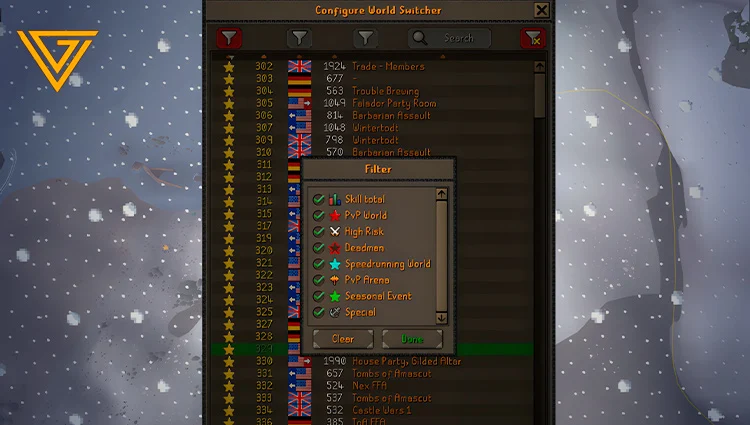
This is probably the most useful filter for keeping your World Selector clean.
The third filter lets you hide different types of special worlds that you may never use during normal OSRS gameplay.
Depending on the current world list, these can include:
- PvP Worlds
- Deadman Worlds
- Speedrunning Worlds
- PvP Arena Worlds
- Event Worlds
- Beta Worlds
- Other special-purpose worlds
If you don't play any of these modes, there's no real reason to keep them mixed into your regular world list.
Why I Recommend Hiding PvP Worlds
There's also a practical safety reason to keep PvP Worlds out of your normal list if you never use them.
A common type of OSRS scam involves convincing someone to hop to a PvP World under some pretext. If you're not paying attention to the world type, you can end up in a situation where your items are at risk.
What Are Deadman Worlds?
Deadman Worlds are designed around OSRS's more aggressive PvP-focused ruleset.
If you're playing standard OSRS and have no interest in Deadman content, there's little reason to keep these worlds visible.
Disable them and remove another category of unnecessary clutter.
What Are Speedrunning Worlds?
Speedrunning worlds are used for OSRS speedrunning content.
Unless you're actively competing in or practicing speedruns, you can hide these worlds without affecting your normal gameplay.
This is another easy filter to disable when building a streamlined world list.
What Are PvP Arena Worlds?
PvP Arena worlds are dedicated to the PvP Arena.
If you don't use the activity, simply disable the category.
There's no benefit to having a bunch of irrelevant PvP Arena servers mixed into the list when you're trying to find a regular world for skilling or PvM.
Event and Beta Worlds
You can also hide event, beta, and other temporary special worlds.
These worlds can become relevant when Jagex runs a particular event or testing period, but outside of those situations, they can just add more noise to the selector.
How to Find Specific OSRS Worlds Quickly
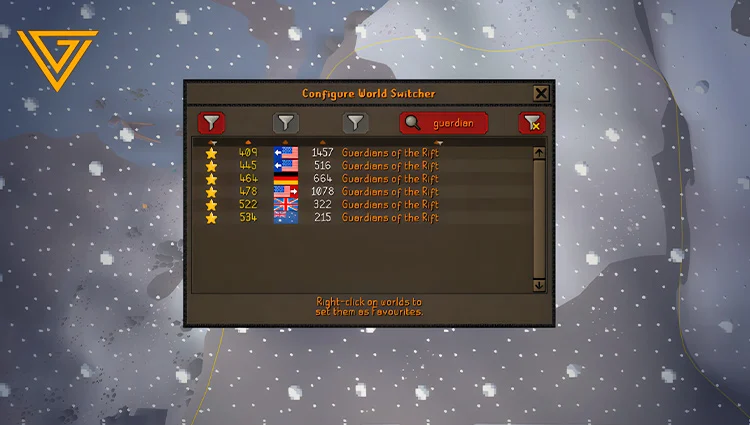
Beyond all the filters we've covered, the OSRS World Selector has another extremely useful feature: activity search.
If you're looking for a specific world for a particular activity, you don't need to manually scroll through the entire world list. Just type the activity you're looking for into the search bar, and the selector will immediately narrow the results down to matching worlds.
How to Find Guardians of the Rift Worlds
Looking for a world dedicated to Guardians of the Rift? Simply type:
GUARDIAN
The World Selector will automatically filter the list and show the worlds that match your search term.




 Arc Raiders
 Grow a Garden 2
 Steal a Brainrot
 Ea Fc 26
 OldSchool Runescape
 VV Ultimatum
 Minecraft Donut SMP
 Plants vs Brainrots
 Grow a Garden
 WarDogs
 RBL Rivals
 Sailor Piece
 Garden Tower Defense
 Animal Crossing: New Horizon
 Blade Ball
 Blox Fruits
 Attack on Titan Revolution
 Adopt Me
 Kick a Lucky Block
 Escape Tsunami for Brainrots
 Flyff Universe
 Type://Soul
 Dungeon Hunters
 Dress To Impress
 Marathon
 WoW Midnight
 RBL
RBL
 Murder Mystery 2
 Albion Online
 Toilet Tower Defense
 Jailbreak
 Pet Simulator 99
 WoW Mist Of Pandaria
 World of Warcraft Classic Era
 World Of Warcraft Classic Anniversary
 Minecraft
 New World
 Dofus
Dofus
 Lost Ark
 Dark and Darker
 Swtor
Swtor
 Diablo 4
 Maplestory
 Final Fantasy XIV
 Runescape 3
 Path Of Exile
 Blade And Soul Neo
 Path Of Exile 2
 Path of Exile 2: Runes of Aldur
 Star Citizen
 Elder Scrolls Online Gold
 Guild Wars 2
 Bubble Gum Simulator INFINITY Pets
 Anime Vanguards
 99 Nights in the Forest
 Fisch
Fisch
 Tower Defense Simulator
 Build a Zoo
 Dead Rails
 Blue Lock: Rivals
 Arise Crossover
 Eve Online
 Growtopia
 Fish It!
 Anime Eternal
 Pets Go!
 Anime Reborn
 Anime Defenders
 INK Game
 Hypershot
 All Star Tower Defense X
 Raise Animals
 Hunty Zombie
 Gym Star Simulator
 War Tycoon
 Grand Piece Online
 Volleyball Legends
 Basketball Zero
 Welcome to Bloxburg
 Anime Card Clash
 The Forge
 Brokheaven RP
 Da Hood
 Anime Fighting Simulator: Endless
 Ashes of Creation
 Tap Simulator
 Devil Hunter
 Baddies
 Jujutsu Infinite
 Break a Lucky Block
 Horse Race
 Chop Your Tree
 Creatures Of Sonaria
 Garden Horizons
 Survive Lava For Brainrots
 Bridger Western
 A Universal Time
 Abyss
Abyss
 Anime Warriors 3
 Delta Force
 Mini War
 Blox Strike
 Wizard Alchemy
 Sniper Arena
 Drag Drive Simulator
 Shindo Life
 Death Ball
 American Plains Mudding
 AION 2
 WoW Forever
 Steal an Egg
 +1 Speed Keyboard Escape